Raw Data: Download, Open, and Use
Download the code: raw-data.R contains all of the R code from this tutorial.
The full Canadian Voting and Policy Attitudes (CVPA) dataset is a single file, dataset.parquet, stored in our GitHub repository. This tutorial shows how to download that file, open it in R, understand how it is organized, and pull out a single question for analysis.
If you mainly want weighted estimates over time, the cvpa R package does all of this for you. The raw file is for when you want to work with the individual responses directly.
Step 1: Download the file
The dataset is about 14 MB. Download it from the repository, either by visiting the file’s page on GitHub and clicking the download button, or directly in R:
download.file(
  "https://github.com/lucasjacklucas/cvpa_dataset/raw/main/dataset.parquet",
  "dataset.parquet", mode = "wb"
)
While you’re there, download the question codebook too. It tells you what each question asked and what its response codes mean:
download.file(
  "https://github.com/lucasjacklucas/cvpa_dataset/raw/main/question_codebook.csv",
  "question_codebook.csv", mode = "wb"
)
Step 2: Open it in R
Parquet is a compressed, column-oriented file format. It is much smaller than a CSV holding the same data and faster to read, but you need a package to open it. We’ll use nanoparquet, which is small and has no dependencies, along with tidyverse for data handling:
install.packages(c("nanoparquet", "tidyverse"))
library(tidyverse)
library(nanoparquet)

cvpa <- read_parquet("dataset.parquet")
The file is small on disk because Parquet compresses repeated values well, but it expands to about 2 GB once loaded in R. Most laptops can handle this. If yours struggles, read only the columns you need with col_select, as in the next section.
Step 3: Look at the data
The dataset has one row for every answer to every question:
dim(cvpa)
[1] 9198156 28
head(cvpa)
# A tibble: 6 × 28
  response_id      survey_id source  year start_date end_date date_source gender
  <chr>            <chr>     <chr>  <dbl> <chr>      <chr>    <chr>        <dbl>
1 bridge_clean_00… bridge_c… CVPA …  2026 2026-01-12 2026-02… recorded         0
2 bridge_clean_00… bridge_c… CVPA …  2026 2026-01-12 2026-02… recorded         0
3 bridge_clean_00… bridge_c… CVPA …  2026 2026-01-12 2026-02… recorded         0
4 bridge_clean_00… bridge_c… CVPA …  2026 2026-01-12 2026-02… recorded         0
5 bridge_clean_00… bridge_c… CVPA …  2026 2026-01-12 2026-02… recorded         0
6 bridge_clean_00… bridge_c… CVPA …  2026 2026-01-12 2026-02… recorded         0
# ℹ 20 more variables: age <dbl>, age_cats <dbl>, region <dbl>, province <dbl>,
#   com_100 <dbl>, com_500 <dbl>, degree <dbl>, occupation <dbl>,
#   religion <dbl>, union_household <dbl>, language <dbl>, language_var <dbl>,
#   language_home <dbl>, mother_tongue <dbl>, survey_mode <dbl>,
#   policy_domain <chr>, policy_domain_label <chr>, issue_label <chr>,
#   question_id <chr>, value <dbl>
A respondent appears once for each question they answered, so their demographic values repeat down their rows. Each row carries four things:
| columns | |
|---|---|
| respondent and survey | response_id, survey_id, source, year, start_date, end_date, date_source |
| demographics | gender, age, age_cats, region, province, com_100, com_500, degree, occupation, religion, union_household, language, language_var, language_home, mother_tongue, survey_mode |
| the question | policy_domain, policy_domain_label, issue_label, question_id |
| the answer | value |
Everything except the identifiers and labels is stored as a numeric code. The codebook lists what each code means. For example, gender is 0 for men, 1 for women, and 2 for non-binary respondents; language is 1 for French and 2 for English.
The data come from five sources spanning 1945 to 2026:
cvpa %>%
  group_by(source) %>%
  summarise(
    respondents = n_distinct(response_id),
    first_year = min(year),
    last_year = max(year)
  )
# A tibble: 5 × 4
  source                  respondents first_year last_year
  <chr>                         <int>      <dbl>     <dbl>
1 CVPA 2026 Bridge Survey        7016       2026      2026
2 Canadian Election Study      168744       1965      2024
3 Environics                   264710       1978      2012
4 Gallup                       509303       1945      2000
5 Pollara                       60231       1992      2002
Vote intention and vote choice are questions here, not columns. They sit in their own policy domain alongside the policy items:
cvpa %>%
  distinct(policy_domain_label, question_id) %>%
  count(policy_domain_label, sort = TRUE)
# A tibble: 8 × 2
  policy_domain_label                       n
  <chr>                                 <int>
1 Economy and Taxation                    139
2 Social Issues, Rights and Justice       123
3 Immigration, Diversity and Federalism   118
4 Health, Education and Social Programs    85
5 Foreign Policy and Identity              73
6 Energy and Environment                   57
7 Democracy and Institutions               34
8 Vote Intention & Choice                   2
Step 4: Find a question
Each question has a question_id and a short issue_label. To see the questions in a domain, list the distinct ids. Here are the questions on foreign policy and identity ("intd"):
cvpa %>%
  filter(policy_domain == "intd") %>%
  distinct(question_id, issue_label) %>%
  head(10)
# A tibble: 10 × 2
   question_id  issue_label
   <chr>        <chr>
 1 bri_intd_002 Canada become part of US
 2 bri_intd_005 Ties with US closer/more distant
 3 bri_intd_006 Canada has distinct culture
 4 bri_intd_007 Support reducing aid to Third World
 5 bri_intd_008 Keep monarch as head of state
 6 bri_intd_012 Urban/rural Cdns same values
 7 bri_intd_001 Compulsory military training at 18
 8 bri_intd_009 Peacekeeping abroad despite risk
 9 bri_intd_010 Canada should improve border security
10 bri_intd_011 Crack down on terrorists vs rights
The full wording and response categories are in question_codebook.csv. It has one row per survey that asked the question, so we keep one row per question. issue_question_id in the codebook matches question_id in the data:
codebook <- read_csv("question_codebook.csv", col_types = cols(.default = "c")) %>%
  distinct(issue_question_id, .keep_all = TRUE) %>%
  select(question_id = issue_question_id, question_wording, recode_type, value_labels)

codebook %>%
  filter(question_id == "bri_intd_005") %>%
  glimpse()
Rows: 1
Columns: 4
$ question_id      <chr> "bri_intd_005"
$ question_wording <chr> "Do you think Canada's ties with the United States sh…
$ recode_type      <chr> "-1/0/1/9999/NA"
$ value_labels     <chr> "More distant, Same, Closer"
recode_type lists the values the question can take and value_labels names the substantive ones in ascending order. So for this question, -1 is “More distant”, 0 is “Same”, and 1 is “Closer”. The code 9999 is don’t know or no opinion. It is a real answer, distinct from NA, and you’ll usually want to decide whether to keep it in the denominator.
Step 5: Pull out one question
Filter the dataset to the question you want. This gives one row per respondent who answered it:
ties <- cvpa %>%
  filter(question_id == "bri_intd_005")

ties %>%
  count(year, value)
# A tibble: 48 × 3
    year value     n
   <dbl> <dbl> <int>
 1  1988    -1   622
 2  1988     0  1245
 3  1988     1  1371
 4  1988  9999   328
 5  1993    -1   945
 6  1993     0  1223
 7  1993     1  1080
 8  1993  9999   516
 9  1997    -1   532
10  1997     0  1700
# ℹ 38 more rows
If memory is tight, you can skip loading the full file and read only the rows and columns you need. nanoparquet can select columns, and the filter runs right after:
ties <- read_parquet(
  "dataset.parquet",
  col_select = c("response_id", "year", "gender", "language", "question_id", "value")
) %>%
  filter(question_id == "bri_intd_005")
Step 6: Summarize it
From here it’s ordinary data analysis. Here is the share of respondents in each year who wanted closer ties with the United States, excluding don’t knows:
ties_by_year <- ties %>%
  filter(value != 9999) %>%
  group_by(year) %>%
  summarise(
    closer = mean(value == 1),
    n = n()
  )

ties_by_year
# A tibble: 12 × 3
    year closer     n
   <dbl>  <dbl> <int>
 1  1988  0.423  3238
 2  1993  0.333  3248
 3  1997  0.273  3072
 4  2000  0.307  2786
 5  2004  0.388  4154
 6  2006  0.342  3918
 7  2008  0.244  3595
 8  2011  0.251  3296
 9  2015  0.384  6897
10  2019  0.364  4961
11  2021  0.361 14196
12  2026  0.257  6531
And the same share broken down by language (1 is French, 2 is English):
ties %>%
  filter(value != 9999, language %in% c(1, 2)) %>%
  mutate(language = if_else(language == 1, "French", "English")) %>%
  group_by(year, language) %>%
  summarise(closer = mean(value == 1), .groups = "drop") %>%
  pivot_wider(names_from = language, values_from = closer)
# A tibble: 12 × 3
    year English French
   <dbl>   <dbl>  <dbl>
 1  1988   0.389  0.533
 2  1993   0.305  0.481
 3  1997   0.239  0.362
 4  2000   0.280  0.360
 5  2004   0.401  0.352
 6  2006   0.339  0.343
 7  2008   0.225  0.293
 8  2011   0.236  0.300
 9  2015   0.364  0.440
10  2019   0.360  0.405
11  2021   0.328  0.435
12  2026   0.246  0.280
ggplot(ties_by_year, aes(x = year, y = closer)) +
  geom_line() +
  geom_point() +
  scale_y_continuous(labels = scales::percent, limits = c(0, NA)) +
  labs(
    x = NULL, y = NULL,
    title = "Share who want closer ties with the United States"
  ) +
  theme_minimal()
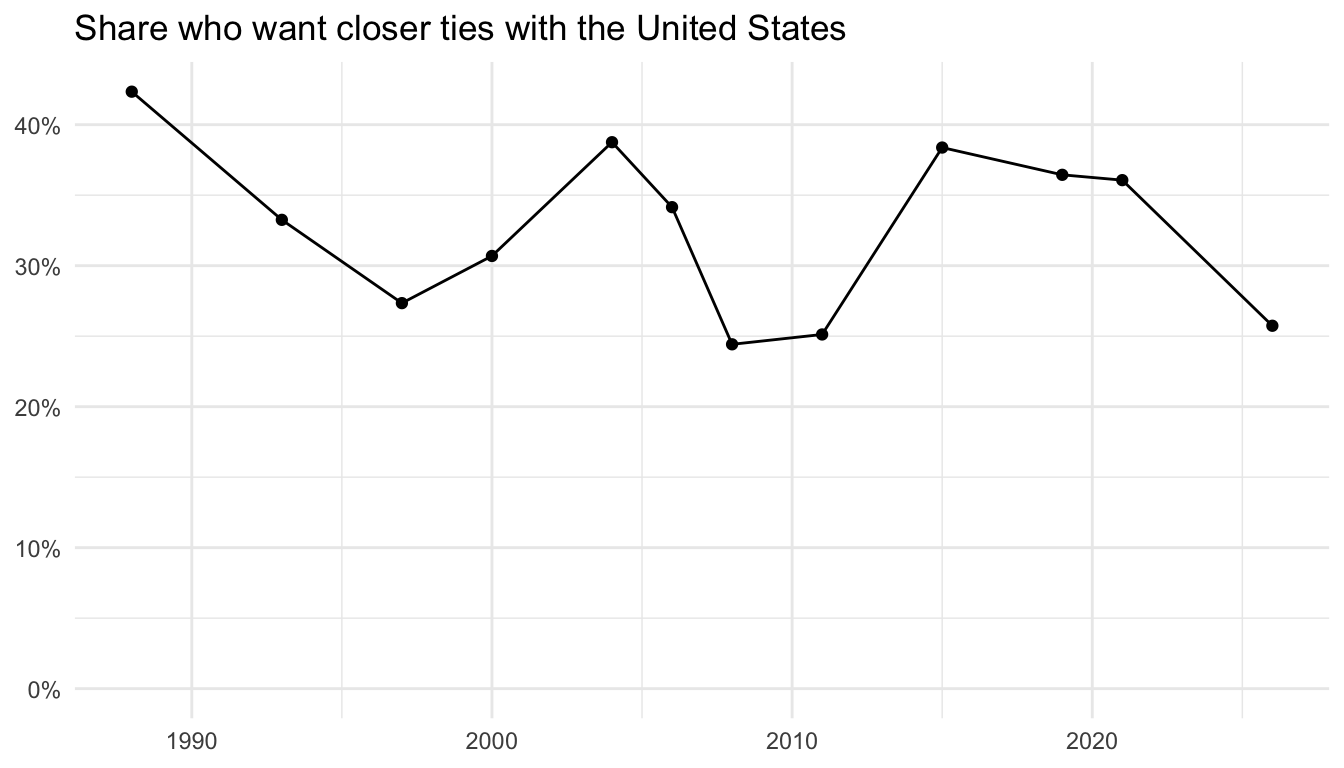
These are unweighted shares of the raw responses. The cvpa R package computes weighted annual estimates from the same data, so for published figures start with the package tutorial.
Where to go next
- The codebook documents every demographic variable, the vote items, and how to read
question_codebook.csv. - Adding Variables from the Original Surveys shows how to link a question we don’t include to CVPA respondents using
response_id. - The interactive app lets you explore any question in the dataset without writing code.