CVPA R Package: Getting Started
Download the code: cvpa-r-package.R contains all of the R code from this tutorial.
The cvpa R package is the easiest way to do data analysis in R using the Canadian Voting and Policy Attitudes (CVPA) dataset. The package downloads the necessary data for you, creates response categories and demographic variables as labelled factors, and computes annually-weighted estimates over time, either for the whole population or broken down by demographic group.
This tutorial provides a basic overview of how to install and load the package, identify a question and download its data, compute weighted responses by year, compute weighted responses by year, broken down by group, and plot the results.
Installing and loading the package
cvpa is hosted on GitHub, in the rpkg folder of the CVPA repository. Install it with the remotes package (you only need to do this once):
install.packages("remotes")
remotes::install_github("lucasjacklucas/cvpa_dataset", subdir = "rpkg")
Then load it, along with tidyverse and ggplot2, which we’ll use for data handling and plotting:
library(cvpa)
library(tidyverse)
library(ggplot2)
Finding a question
Next, use update_cvpa_data() to download the question catalog (a small file listing every question in the dataset) to a local cache:
update_cvpa_data(quiet = TRUE)
question_catalog() returns one row per question, with its code, policy domain, a short label, the full question wording, the response categories, and the number of survey waves that asked it. You can filter it to a single domain. Here we look at questions on international affairs and defence ("intd"):
question_catalog(domain = "intd") %>%
  select(question, issue_label, value_labels, n_waves) %>%
  arrange(desc(n_waves)) %>%
  head(10)
# A tibble: 10 × 4
   question     issue_label                          value_labels        n_waves
   <chr>        <chr>                                <chr>                 <int>
 1 env_intd_016 Appr fed govt: defence policy        Disapprove, Approve      37
 2 env_intd_003 Opinion of US favourable             Unfavourable/Neith…      18
 3 bri_intd_007 Support reducing aid to Third World  Do not support, Su…      13
 4 bri_intd_005 Ties with US closer/more distant     More distant, Same…      12
 5 env_intd_013 Cdn identity: the flag               Not important, Imp…      11
 6 env_intd_018 Appr fed govt: foreign policy        Disapprove, Approve      10
 7 env_intd_017 Appr fed govt: promoting world peace Disapprove, Approve      10
 8 env_intd_047 Appr Cdn military action Afghanistan Disapprove, Approve       9
 9 bri_intd_004 Fed spending: defence                Less, Same, More          9
10 env_intd_022 Cda spending on poor countries       Too much, Right am…       8
For this tutorial we’ll use bri_intd_005, a question on Canada’s relationship with the United States. This question was asked in twelve survey years between 1988 and 2026:
question_catalog() %>%
  filter(question == "bri_intd_005") %>%
  pull(question_wording)
[1] "Do you think Canada's ties with the United States should be closer or more distant?"
Our Data page has the same catalog as a searchable table, if you’d rather browse there.
Loading the data
The catalog is only an index. To get the respondent-level data for a question, pass its code to update_cvpa_data(). Questions you’ve already downloaded are skipped, so this is safe to rerun.
update_cvpa_data(questions = "bri_intd_005", quiet = TRUE)
question_data() then reads that question from the cache:
us_ties <- question_data("bri_intd_005")
glimpse(us_ties)
Rows: 55,221
Columns: 18
$ response_id     <chr> "2021 Canadian Election Study v1.0_05715", "ces1997_00…
$ survey_id       <chr> "2021.dta", "1997.dta", "2021.dta", "2015.dta", "2021.…
$ response        <fct> Same, Closer, Closer, Same, Same, Closer, More distant…
$ weight          <dbl> 0.9751288, 1.1308449, 0.8149904, 1.7885825, 0.9703051,…
$ year            <dbl> 2021, 1997, 2021, 2015, 2021, 2021, 2021, 2021, 2021, …
$ vote_intention  <fct> PC/Conservative, Liberal, PC/Conservative, NA, Liberal…
$ vote_choice     <fct> PC/Conservative, Liberal, PC/Conservative, NA, Liberal…
$ region          <fct> Prairies, Quebec, Ontario, Prairies, Ontario, Quebec, …
$ province        <fct> MB, QC, ON, AB, ON, QC, ON, ON, ON, QC, BC, QC, QC, ON…
$ com_500         <fct> Population <= 500k, NA, Population <= 500k, Population…
$ com_100         <fct> Population <= 100k, NA, Population <= 100k, Population…
$ gender          <fct> Woman, Woman, Man, Man, Woman, Man, Woman, Woman, Woma…
$ age_cats        <fct> 30-49, 50+, 50+, 30-49, 50+, 50+, 30-49, 18-29, 18-29,…
$ religion        <fct> Protestant, Catholic, None, NA, Catholic, None, None, …
$ degree          <fct> No University Degree, No University Degree, No Univers…
$ language        <fct> English, French, English, English, English, French, En…
$ union_household <fct> NA, NA, NA, NA, NA, NA, NA, NA, NA, NA, NA, NA, NA, NA…
$ occupation      <fct> NA, NA, NA, "Routine Non-manual", NA, NA, NA, NA, NA, …
There is one row per respondent per survey. The columns are:
response: the respondent’s answer, as a factor (More distant,Same,Closer)weight: the survey weightyear: the year of the surveyresponse_idandsurvey_id: identifiers for the respondent and the source survey- vote intention, vote choice, and eleven demographic variables, all as factors. These are the variables you can break results down by.
The demographic_vars table describes each demographic variable and lists its categories:
demographic_vars %>%
  select(variable, description)
# A tibble: 11 × 2
   variable        description
   <chr>           <chr>
 1 region          Region of residence
 2 province        Province or territory of residence
 3 com_500         Community size, split at 500,000 population
 4 com_100         Community size, split at 100,000 population
 5 gender          Respondent gender. Binary Man/Woman only -- a non-binary/oth…
 6 age_cats        Age category
 7 religion        Religious affiliation
 8 degree          University degree attainment
 9 language        Language spoken
10 union_household Union membership in the household
11 occupation      Respondent's occupation
Weighted responses by year
wtd_response() computes the weighted share of respondents choosing each response category in each year. With no other arguments, it gives one set of estimates per year for the full sample:
overall <- wtd_response(us_ties)
overall
# A tibble: 36 × 4
    year response     count response_share
   <dbl> <fct>        <dbl>          <dbl>
 1  1988 More distant  604.          0.198
 2  1988 Same         1163.          0.381
 3  1988 Closer       1288.          0.422
 4  1993 More distant  966.          0.295
 5  1993 Same         1244.          0.380
 6  1993 Closer       1065.          0.325
 7  1997 More distant  534.          0.177
 8  1997 Same         1672.          0.556
 9  1997 Closer        804.          0.267
10  2000 More distant  464.          0.170
# ℹ 26 more rows
count is the sum of the survey weights for that response in that year, and response_share is the share of the year’s total, so the three shares in each year add up to 1. When a question was asked in more than one survey in the same year, wtd_response() pools those surveys.
To limit the estimates to particular years, use the years argument, e.g. wtd_response(us_ties, years = 2000:2026).
Weighted responses by group
To break the estimates down by group, name the variable in grouping_vars. Here we use vote intention, which lets us compare the supporters of different parties:
by_party <- wtd_response(us_ties, grouping_vars = "vote_intention")
by_party
# A tibble: 248 × 5
    year response     vote_intention  count response_share
   <dbl> <fct>        <fct>           <dbl>          <dbl>
 1  1988 More distant Liberal         157.          0.240
 2  1988 More distant PC/Conservative  52.6         0.0579
 3  1988 More distant CCF/NDP         175.          0.372
 4  1988 More distant Other            21.9         0.237
 5  1988 More distant Undecided       137.          0.209
 6  1988 Same         Liberal         320.          0.489
 7  1988 Same         PC/Conservative 227.          0.249
 8  1988 Same         CCF/NDP         186.          0.396
 9  1988 Same         Other            32.9         0.356
10  1988 Same         Undecided       279.          0.424
# ℹ 238 more rows
Now response_share is calculated within each year and party, so the shares in each year–party combination add up to 1. The demographic variables in demographic_vars work the same way. The full list of valid grouping variables is in cvpa_grouping_vars:
cvpa_grouping_vars
 [1] "vote_intention"  "vote_choice"     "region"          "province"
 [5] "com_500"         "com_100"         "gender"          "age_cats"
 [9] "religion"        "degree"          "language"        "union_household"
[13] "occupation"
You can also pass more than one variable, e.g. grouping_vars = c("region", "gender"), but be aware that cell sizes can get small quickly when you use more than one variable.
Plotting the results
Because wtd_response() returns a tidy data frame, it goes straight into ggplot2. First, the overall trend:
response_colours <- c("More distant" = "#eb6834", "Same" = "#8a8a85", "Closer" = "#2a78d6")

ggplot(overall, aes(x = year, y = response_share, colour = response)) +
  geom_line(linewidth = 0.8) +
  geom_point(size = 2) +
  scale_colour_manual(values = response_colours) +
  scale_y_continuous(labels = scales::percent, limits = c(0, NA)) +
  labs(
    title = "Should Canada's ties with the United States be closer or more distant?",
    x = NULL, y = "Weighted share of respondents", colour = NULL
  ) +
  theme_minimal(base_size = 12) +
  theme(legend.position = "top", panel.grid.minor = element_blank())
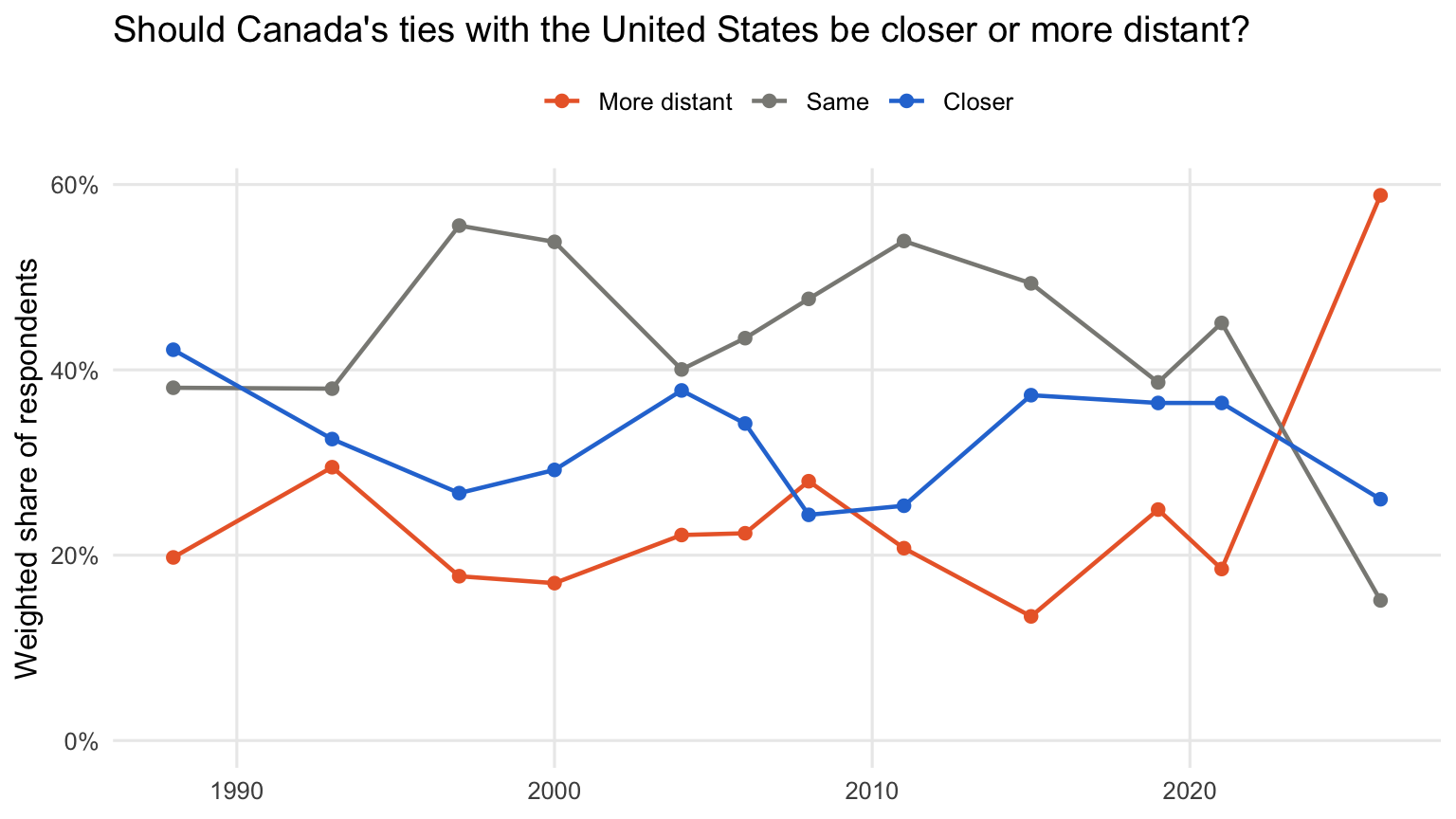
For roughly three decades, Canadians mostly wanted ties to stay the same or get closer. Then, in 2026, a majority wanted them to be more distant.
The party breakdown has many more lines. Plotting every response category for every party would be hard to read, so we use dplyr::filter() to keep a single response category (Closer) and the three parties that ran candidates in every year (vote intention also includes smaller parties and undecided respondents):
party_colours <- c("Liberal" = "#d71920", "PC/Conservative" = "#1a4782", "CCF/NDP" = "#f37021")

by_party %>%
  filter(
    response == "Closer",
    vote_intention %in% names(party_colours)
  ) %>%
  ggplot(aes(x = year, y = response_share, colour = vote_intention)) +
  geom_line(linewidth = 0.8) +
  geom_point(size = 2) +
  scale_colour_manual(values = party_colours) +
  scale_y_continuous(labels = scales::percent, limits = c(0, NA)) +
  labs(
    title = "Share who want closer ties with the United States, by vote intention",
    x = NULL, y = "Weighted share of respondents", colour = NULL
  ) +
  theme_minimal(base_size = 12) +
  theme(legend.position = "top", panel.grid.minor = element_blank())
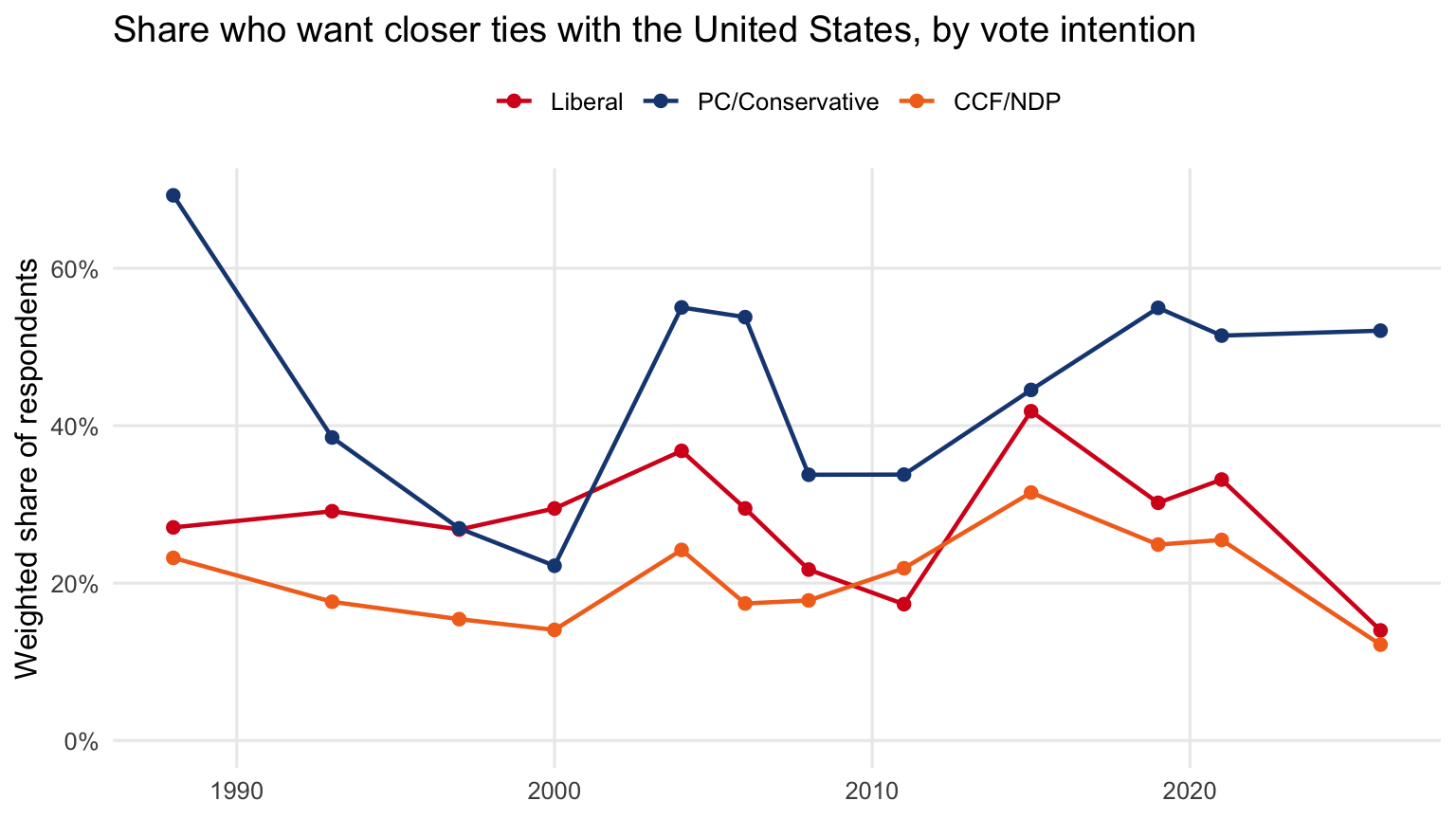
Conservative supporters have usually been the most likely to want closer ties with the United States. In 2026 the gap became much wider. Liberal and NDP supporters who wanted closer ties fell to the lowest levels in the series, while Conservative support for closer ties held steady.
To see every response category at once, drop the response == "Closer" condition and add facet_wrap(~ response) to the plot.
Next steps
- Swap in any question code from
question_catalog()or the Data page. The same three steps work for every question:update_cvpa_data(questions = ...),question_data(), thenwtd_response(). - Vote choice and vote intention are treated as questions too:
question_data("vote_choice")followed bywtd_response()gives weighted vote shares by year.